Posts

Convert a color image to black and white image in C#

In this simple article you will learn that how we can convert colored image into black and white image in C#.net. This technique uses a ColorMatrix to perform the conversion. A ColorMatrix is a 5x5 matrix that can make just about any modifications to the color of an image. A ColorMatrix is pretty complicated and deserves a whole tutorial to itself. We're going to use GDI to draw the new black and white image. The benefit of this technique over the last one is that we don't need to know any information about the image's pixel format. The code here is pretty straight forward. First create the blank image and get a Graphics object from it. Next, create the ColorMatrix that will convert the original image to grayscale. Declare an ImageAttributes object that will use the ColorMatrix and use it to draw the new image using DrawImage . Below is code for your proble m      

Document Upload in Azure Cloud with ASP.Net MVC

Configure Azure storage connection string To configure your connection string, open the web .config or app.config file from Solution Explorer in Visual Studio.Add below line in <appSettings> tag of your config file. Replace "your account name" with the name of your storage account, and "your account key" with your account access key: < add key = " StorageConnectionString " value = " DefaultEndpointsProtocol=https;AccountName=<your account name>;AccountKey=<your account key> " /> Parse the connection string from Config file The Microsoft Azure Configuration Manager Library for .NET provides a class for parsing a connection string from a configuration file. below is example that shows to retrieve a connection string from a configuration file: CloudStorageAccount storageAccount = CloudStorageAccount .Parse( CloudConfigurationManager .GetSetting( "StorageConnectionString" )); Above line w...

Export excel and Pdf with Kendo UI MVC c#

Image
Export to Excel and Pdf Export excel and pdf is now a days a basic needs of clients for saving reports or tables data. Kendo UI has build features for exporting table data to excel and pdf with Excel() and Pdf() functions. Functions are used as below. @(Html.Kendo().Grid(Model) .Name("timeGrid") .NoRecords() .Columns(columns => { columns.Bound(p => p.Field1).Title("Field1"); columns.Bound(p => p.Field2).Title("Field2"); columns.Bound(p => p.Field3).Title("Field3"); }).Groupable() .Sortable() .Excel(excel => excel .FileName("FileName.xlsx").AllPages(true) .Filterable(true) .ProxyURL(Url.Action("Excel_Export_Save", "Controller")) ) .Pdf(pdf => pdf .AllPages() .FileName("FileName.pdf").ForceProxy(true) .ProxyURL(Url.Action("Pdf_Export_Save...

File Upload uisng Jquery in C# ASP.Net MVC

There so many ways to upload files with jqueries in ASP.Net C#. One way is with creating XMLHttpRequest and another way is with FormData object. In this post i'll show uploading files and saving form data in one ajax call using jquery. Upload Files with Jquery in ASP.Net MVC C# First code for View which represents normal html code of form @model modelname File Upload File @Html.TextBoxFor(m => m.File, new { @type = "file", @multiple = "multiple" }) Field 1 @Html.TextBoxFor(m => m.Field1, new { @class = "form-control datepicker" }) @Html.ValidationMessageFor(m => m.Field1) Submit MVC Controller Code for Saving File In controller create action method with two arguments one is for formdata and another one is for List of HttpPostedFileBase Class which represents multiple files that you select. public JsonResult SaveFilesWithFormData(ModelName FormData, List Of HTTPPostedFileBase Files) //Model Name rep...

Display image from byte array in ASP.NET MVC

Image
There are many ways to display image from byte array in MVC as well as normal ASP.Net projects.In this post I'll explain couple of them. 1) Using BASE64 string of the image through ViewBag  The first way i s by sending a Base64 string as dataURL through ViewBag. As shown in b elow action method under consideration generates such a Base64 string of the image (often called Data URL) and then pass it to the view via a ViewBag property in MVC . public ActionResult Image() { string path = Server.MapPath("~/images/computer.png"); byte[] imageByteData = System.IO.File.ReadAllBytes(path); string imageBase64Data=Convert.ToBase64String(imageByteData); string imageDataURL= string.Format("data:image/png;base64,{0}", imageBase64Data); ViewBag.ImageData = imageDataURL; return View(); } The above code is a action method of Controller. In this action method it uses physical path of image and read all bytes of that image using ReadAllByte...

C# Currency Converter using Google API

C urrenc y conve rsion in C# u sing Googl e API There are so many ways to convert amount from one currency to another currency like using google finance converter, Yahoo finance and rate-exchange . In this post i will show conversion using   Google Finance Converter. In b elow code, I create one WebRequest for Google Finance Converter which will return result of arguments which are attached with it. Get the response of WebRequest in form of Stream and stored it in streamReader (which is the object of StreamReader Class) . By using, Regex fetched converted amount with desired currency code and stored this result into a string variable and again using Regex fetched only decimal part from generated string. Hope this post will help you to get the exact result that you want. public string CurrencyConvert(decimal amount, string fromCurrency, string toCurrency) { decimal currency = 0; string convertedAmount = "0"; try { string...

Allow only numbers in textbox jquery

For allowing only numbers in textbox using jQuery, you can create key-press or key-down or key-up event for textbox by using textbox id or class. In below example i used class name ("number") for applying validation to textbox.  You just had copy above code and paste where you want to apply numeric validation. For allowin g numbers with decimal points  

Url rewrite for non-www to www in C#

WWW version is very useful to make your web site easily searchable by web crawler also WWW version helps to increase your chances make your web site rank higher in SEO purpose. One common use of URL Rewrite is redirecting http://domain.com to http://www.domain.com.  Many people are doing this for search engine optimization (SEO) so that search engines only see the one site, rather than two sites.  The goal is to set a permanent 301 redirect.  URL Rewrite works at the global level, or site level (or application level for that matter).  Where you apply it is really up to how you manage your server.  Either will work for a domain name redirect like this. You can choose to create the rules using IIS Manager, or using a text editor and updating web.config directly. For specifying non-WWW version to WWW version for your web site in C#.net, write below code in web.config inside system.webServer tag,

Check valid JSON String

Image
To check whether entered string is in valid json format or not. Use below link. Check Valid JSON If you entered valid json string it will show output as shown in below image : If you entered invalid json string it will show output as shown in above image

MVC CRUD Operations Using jQuery JSON and LINQ To SQL Class

Image
Step 1 : Database Create an EmployeeData table in a SQL database as in the following Step 2 : LINQ to SQL class Create a LINQ to SQL class to read data from the table as in the following: After using the Server Explorer and adding an EmployeeData table in the surface area as in the following: Now add a controller to the CRUD operations for EmployeeData. So open the Solution Explorer and right-click on the controller folder and add a controller as in the following: Step 3 : Controller  Now create a select controller, an insert controller, an edit controller and a the Delete controller as in the following: Step  4 : View Now create a view and a partialview on a right-click corresponding to the controller as in the following: 1. Index View (select data) In this figure see the view name is auto create, it's not changed. After selecting a Template and Model class as shown in the following figure. 2. Create View (Insert data) Create ...

Back to Top using Jquery

You can use following links for applying back to top functionality in your web site, blog, etc. Back-to-top-button-jquery   Scroll to top readymade demos with code   Add-sticky-back-top-button-website    

Add google translator to website

Image
For adding google language tranlator to your web site click on below link Add google translator to website Step 1 :   Enter your website url and select default language which you want to apply when your website loads first.    Step 2 :  Select languages which you want to use for your website to be translated.You select use all languages or specific languages, Select display mode for language translator display like vertical, horizontal or dropdown only. Based on your requirements select advanced options. Click on Get Code button to get code for translator plugin. Step : 3     Copy code from which shown in textbox and paste that code where you want to display translator in your website.  

Add url to google

Image
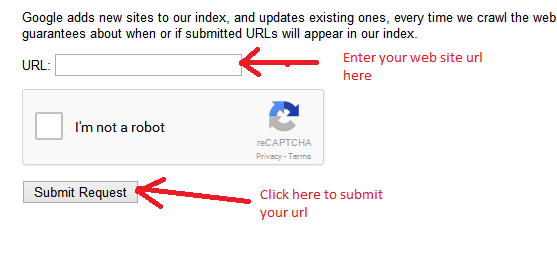
For adding url click on below link Add url to google After completing this process with 2-3 days Google verify your url and based on your SEO it will ranks your site.  After applying ranking it will add your url to its database

Email sending in C#

Email sending with Attachment public static bool SendEmailMessage( string SenderEmailAddress, string SenderPassword, string SenderHostName, int SenderPort, string Subject, string Body, string emailTO, bool EnableSSL = false, string CC = "", string BCC = "", MailPriority Priority = MailPriority .Normal, string path = "") {             try             {                 System.Net.Mail.MailMessage objMail = new System.Net.Mail.MailMessage();                 //Set from address                 objMail.From = new MailAddress(SenderEmailAddress);                  // Set to addr...

Export GridView to CSV/Excel in C#

Step 1 : Bind GridView             //This allows you to bind all data of GridView into ExcelSheet             GridView1.AllowPaging = false;             GridView1.DataSource = //List Object or DataTable             GridView1.DataBind();   Step 2 : Export GridView To Excel              HttpContext .Current.Response.ClearContent();             HttpContext .Current.Response.AddHeader("content-disposition", "attachment; filename="                           + fileName + ".xls");   // fileNmae = Name of file             ...

Create DataTable from List in C#

T is type of Class which you want convert i.e. T = Class Name  public static DataTable ConvertToDataTable<T> (List <T> data)  {             //Create property description collection object of you table type object             PropertyDescriptorCollection properties = TypeDescriptor.GetProperties(typeof(T));             DataTable table = new DataTable();            //Bind object field as header row of DataTable             foreach (PropertyDescriptor prop in properties)             {                 table.Columns.Add(prop.Name, typeof(string)); ...

Image cropping in C#

public static byte [] CropImage( string Img, int Width, int Height, int X, int Y) {             try             {                 //Generate Image from specified Image file path                 //Img = file path                 System.Drawing.Image OriginalImage = System.Drawing.Image.FromFile(Img);                 //Generate Bitmap with given Width and Height                 Bitmap bmp = new Bitmap(Width, Height);                //Set Resolution of Bitmap  ...

Convert Number into text format in C#

Below function will convert inputted number into text format public static string NumberToText( int number, bool isUK) {             // return "Zero" if number is 0             if (number == 0) return "Zero";                        string and = isUK ? "and " : ""; // deals with UK or US numbering               if (number == -2147483648) return "Minus Two Billion One Hundred " + and +             "Forty Seven Million Four Hundred " + and + "Eighty Three Thousand " +             "Six Hundred " + and + "Forty Eight";             int[] num = ...

Check string is number or not in C#

Int.TryParse() method converts string into integer and if this conversion is not possible then it will return false means your inputted string is not number string number = "1234"; int a = 0; bool isNumber = int.TryParse(number, out a); if (isNumber == true) {             //string is valid number } else {            //Given string is not a number }