Posts

Back to Top using Jquery

You can use following links for applying back to top functionality in your web site, blog, etc. Back-to-top-button-jquery   Scroll to top readymade demos with code   Add-sticky-back-top-button-website    

Add google translator to website

Image
For adding google language tranlator to your web site click on below link Add google translator to website Step 1 :   Enter your website url and select default language which you want to apply when your website loads first.    Step 2 :  Select languages which you want to use for your website to be translated.You select use all languages or specific languages, Select display mode for language translator display like vertical, horizontal or dropdown only. Based on your requirements select advanced options. Click on Get Code button to get code for translator plugin. Step : 3     Copy code from which shown in textbox and paste that code where you want to display translator in your website.  

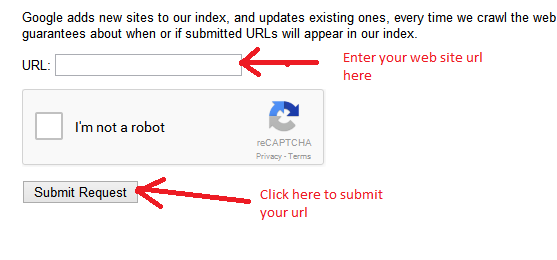
Add url to google

Image
For adding url click on below link Add url to google After completing this process with 2-3 days Google verify your url and based on your SEO it will ranks your site.  After applying ranking it will add your url to its database

Email sending in C#

Email sending with Attachment public static bool SendEmailMessage( string SenderEmailAddress, string SenderPassword, string SenderHostName, int SenderPort, string Subject, string Body, string emailTO, bool EnableSSL = false, string CC = "", string BCC = "", MailPriority Priority = MailPriority .Normal, string path = "") {             try             {                 System.Net.Mail.MailMessage objMail = new System.Net.Mail.MailMessage();                 //Set from address                 objMail.From = new MailAddress(SenderEmailAddress);                  // Set to addr...

Export GridView to CSV/Excel in C#

Step 1 : Bind GridView             //This allows you to bind all data of GridView into ExcelSheet             GridView1.AllowPaging = false;             GridView1.DataSource = //List Object or DataTable             GridView1.DataBind();   Step 2 : Export GridView To Excel              HttpContext .Current.Response.ClearContent();             HttpContext .Current.Response.AddHeader("content-disposition", "attachment; filename="                           + fileName + ".xls");   // fileNmae = Name of file             ...

Create DataTable from List in C#

T is type of Class which you want convert i.e. T = Class Name  public static DataTable ConvertToDataTable<T> (List <T> data)  {             //Create property description collection object of you table type object             PropertyDescriptorCollection properties = TypeDescriptor.GetProperties(typeof(T));             DataTable table = new DataTable();            //Bind object field as header row of DataTable             foreach (PropertyDescriptor prop in properties)             {                 table.Columns.Add(prop.Name, typeof(string)); ...

Image cropping in C#

public static byte [] CropImage( string Img, int Width, int Height, int X, int Y) {             try             {                 //Generate Image from specified Image file path                 //Img = file path                 System.Drawing.Image OriginalImage = System.Drawing.Image.FromFile(Img);                 //Generate Bitmap with given Width and Height                 Bitmap bmp = new Bitmap(Width, Height);                //Set Resolution of Bitmap  ...